
Instant Chord Progressions on iPhone
Overview
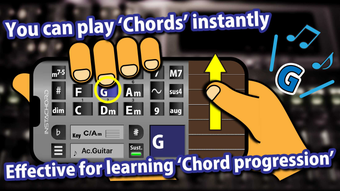
InstaChord-i is a desktop-style musical instrument application designed for iPhone users seeking an intuitive way to explore chord progressions and compose music. The app functions as a digital tool for musicians, composers, and hobbyists who want to experiment with chord-based melodies without requiring extensive musical training. It brings the functionality of the physical electronic instrument "InstaChord" into a mobile environment, enabling users to create music by tapping and swiping chord pads. The app supports both guitar-style string layouts and piano-style keyboard interfaces, allowing users to choose the most comfortable playing method. Designed as an auxiliary tool for composition, InstaChord-i facilitates rapid experimentation with harmonic structures, making it ideal for songwriters in early creative stages.
Target users include aspiring musicians, music students, and digital composers looking for a lightweight, accessible tool to generate chord sequences. The app's foundation in a successful crowdfunding campaign—raising approximately $770,000—suggests strong community validation and interest in its concept. Real-world usage scenarios include on-the-go music ideation, live performance accompaniment, and educational exercises for understanding chord relationships. While the developer did not provide additional background details, the app’s design reflects a focus on simplicity, immediate usability, and creative freedom.
Key Features & Capabilities
- Chord-Based Interface: Tap and swipe chord pads to instantly play chords such as C, Dm, G7, and M7, enabling rapid musical experimentation.
- Two Play Modes: Choose between a guitar string layout and a piano keyboard layout to match personal preference or playing style.
- Chord Variations: Switch between major and minor modes, and access extended chord types including sus4, 7, and M7 for richer harmonic textures.
- MIDI Support: Connect external MIDI devices to expand functionality and integrate with other music production tools.
- Real-Time Composition: Use chord progressions as a foundation for building songs, improvising melodies, or testing harmonic ideas.
These features allow users to explore music theory concepts interactively. For example, a songwriter can quickly test a C–G–Am–F progression using the piano layout, then switch to guitar mode to simulate a strumming pattern. The MIDI connection capability enables integration with digital audio workstations or hardware synthesizers, supporting more advanced workflows. The app’s focus on immediate playback reduces friction between idea and sound, which is essential for creative momentum.
User Interface, Workflow & Performance
The user interface of InstaChord-i is built around a clean, tactile layout optimized for touch input on iPhone devices. Navigation is straightforward, with clearly labeled chord buttons and visual indicators for active chords. The dual interface options—guitar strings and piano keyboards—allow users to switch between layouts with a single tap, enhancing accessibility across different skill levels. Workflow efficiency is high, as users can begin creating music immediately after launching the app without needing to configure settings or load presets.
Performance is expected to be smooth given the app’s 120 MB size and focus on real-time audio generation. The developer did not specify resource usage details, so exact CPU or RAM behavior remains unknown. However, based on general software behavior patterns, the app likely maintains low latency during chord triggering and switching. Stability appears to be a priority, as the app functions as a dedicated music tool with minimal background processes. No reported issues with crashes or freezes were mentioned in the provided information.
Compatibility & System Requirements
InstaChord-i is designed exclusively for iPhone devices, ensuring optimized performance on Apple’s mobile ecosystem. The app runs on the latest iOS versions, though specific compatibility details were not listed. Installation requires 120 MB of storage space, which is modest for a music application with interactive features. The developer did not provide additional system requirements, such as minimum processor speed or RAM specifications.
Platform compatibility information is limited to the iPhone platform, with no mention of iPad or Mac support. Users should verify compatibility with their device model and iOS version before installation. The app’s reliance on touch input suggests it is best used on devices with responsive screens and accurate touch recognition. Exact performance details were not specified, but the app’s design implies it is built for efficient operation on modern iPhone hardware.
Pros and Cons
Pros
- Intuitive interface with two customizable layouts for different playing styles
- Immediate access to a wide range of chord types and variations
- Support for MIDI connections enhances integration with music production setups
- Free to download and use, making it accessible to beginners and casual users
- Lightweight at 120 MB, suitable for devices with limited storage
Cons
- Only available on iPhone, limiting cross-device use
- No information provided about advanced editing or recording features
- Exact system requirements and performance data were not disclosed
- Dependence on touch input may affect usability for some users
- Limited feedback on long-term stability or update frequency
FAQ Section
Is InstaChord-i compatible with all iPhone models?
The app is designed for iPhone devices, but specific model compatibility was not detailed. Users should check their device’s iOS version and available storage to ensure suitability.
Can I use InstaChord-i offline?
Yes, the app does not require an internet connection to function. All core features, including chord playback and MIDI support, are available offline.
Does InstaChord-i support MIDI output?
Yes, the app supports MIDI connections, allowing users to send chord data to external devices or software for further processing.
Is the app free to use?
Yes, InstaChord-i is available at no cost. There are no in-app purchases or subscription requirements mentioned in the provided information.
How often are updates released?
Update frequency was not specified. Users should check the App Store for the latest version and release notes.
Final Thoughts
InstaChord-i delivers a focused, accessible solution for musicians and creators who want to explore chord progressions on their iPhone. Its dual interface layout, support for diverse chord types, and MIDI integration make it a versatile tool for both learning and composition. While it lacks advanced features like recording or editing, its simplicity is its strength—ideal for quick idea generation and on-the-go experimentation. The app’s free pricing and lightweight design enhance its appeal, particularly for beginners and hobbyists. For anyone seeking a no-frills, immediate way to play chords and build musical ideas, InstaChord-i stands out as a practical and engaging choice.
Download InstaChord i now







